



You've probably seen "end-to-end encrypted" stamped on WhatsApp, iMessage, or somewhere in a news story about a government trying to ban it. The "two ends" are your device and the other person’s.
End-to-end encryption means a message is scrambled on your device before it goes anywhere and only unscrambled when it lands on the recipient's device. Nobody in the middle can read it. Not the platform. Not the server routing it. Not your ISP. Not a government agency with a court order pointed at the company's servers. The contents are gibberish to everyone except the two devices in the conversation.
That’s where E2EE splits from everything else that uses the word "encrypted." When a service tells you your data is encrypted, they usually mean they have encrypted the pipe between you and their server. They still hold the keys on the other end. They’re asking you to trust their privacy policy, their engineers, their legal team, and every government that can compel them to hand data over.
E2EE removes the trust requirement entirely. The platform cannot read your messages even if it wants to, even if it’s ordered to, because it never had the key in the first place.
How End-to-End Encryption Works
Every E2EE system runs on a pair of cryptographic keys: a public key and a private key. They are mathematically linked, generated together, and they work in one direction only. Anything encrypted with your public key can be decrypted by exactly one thing: your private key.
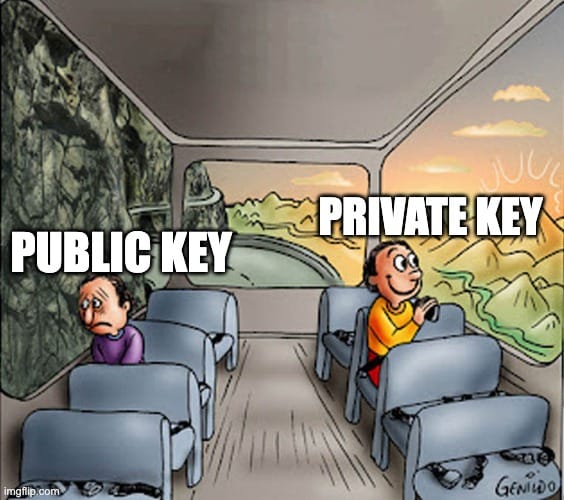
Your public key is shareable by design. Post it on your website, hand it to a server, send it to a stranger. It doesn’t matter. Your private key is the opposite. It never leaves your device. Not to the server, not to the platform, not anywhere.
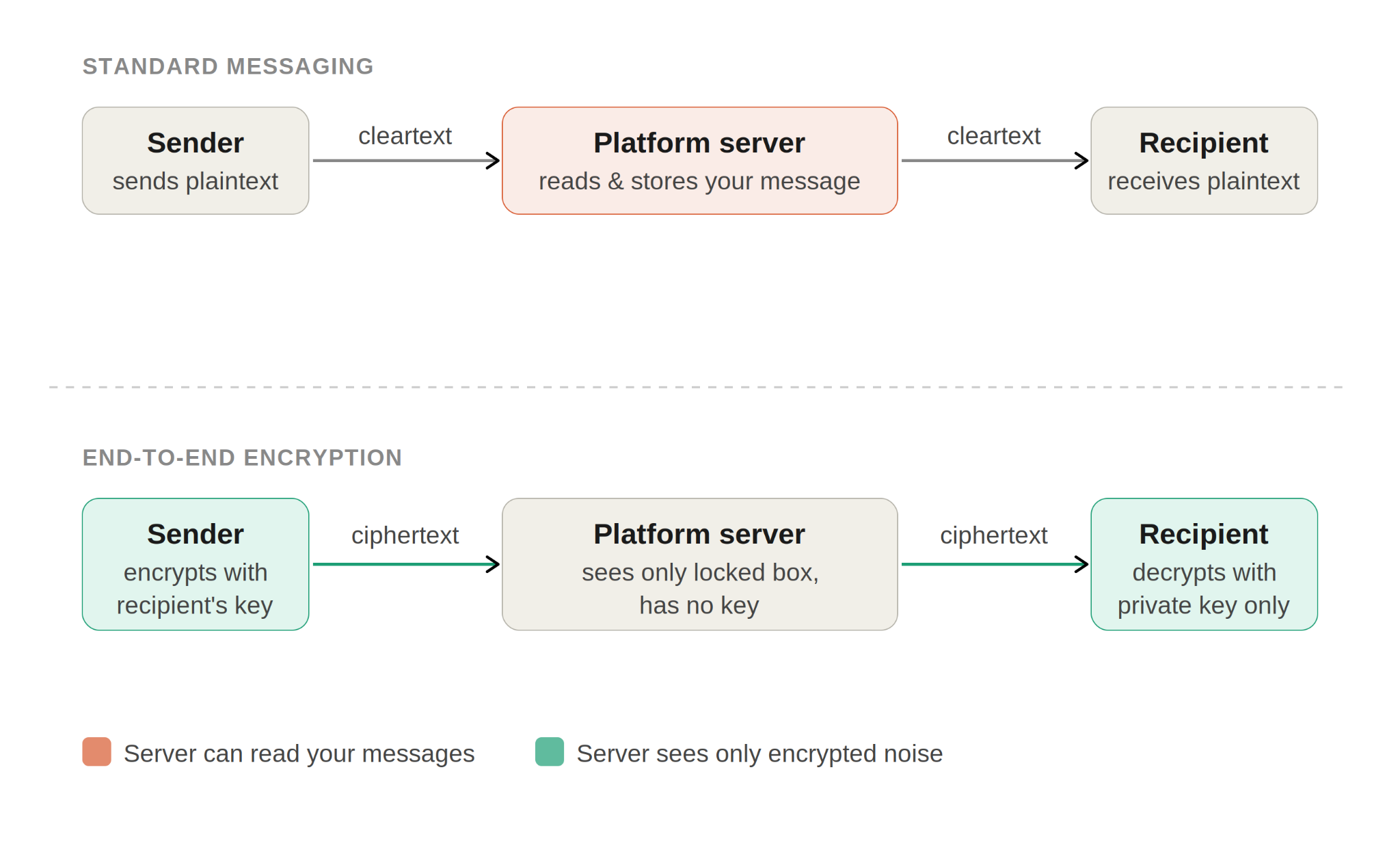
When you send an E2EE message, your device reaches for the recipient's public key and uses it to lock the message before it goes anywhere. What travels through the platform's servers is ciphertext (the encrypted, scrambled version of your message), essentially random noise to anyone without the right key. The server passes it along without being able to read it. When it arrives, the recipient's device uses their private key to unlock it. That's the whole chain.
So, how does your device get the recipient's public key in the first place? Great question! The platform's servers act as a key directory. Your app asks for it, the server hands it over, and that exchange is completely safe because a public key is, by definition, meant to be public. The private key is the only piece that matters, and it never touches the server.
Modern E2EE goes a step further with forward secrecy (a system where each message uses a unique, throwaway key, so that even if one key is ever stolen, it can’t unlock any previous conversations). Rather than using the same key for every message, protocols like Signal's double ratchet (the technical mechanism that continuously generates and discards those fresh keys) generate a fresh key for each exchange.
So, even if someone manages to compromise a key down the road, they cannot use it to decrypt anything that was already sent. Every conversation is a clean slate. It’s the reason the Signal Protocol has become the default choice for serious encrypted messaging, and why you’ll find it running under the hood in apps well beyond Signal itself.
End-to-End Encryption vs Encryption in Transit (TLS / HTTPS)
You've seen the padlock in your browser bar. That's HTTPS, built on the TLS (Transport Layer Security) protocol. It encrypts the connection between your device and the website's server. It’s not E2EE, and conflating the two is exactly what a lot of the "your data is safe with us" marketing relies on.
The difference is that TLS protects the message between you and the server, and E2EE protects the message between you and the other person. Those aren’t the same thing. When your message arrives at a TLS-protected server that doesn't use E2EE, the tunnel closes, and the server is holding a fully readable copy.
The platform can read it, index it, store it indefinitely, and hand it over the moment a legal request lands on their desk. The padlock told you the delivery was secure. It said nothing about what happens after delivery.
But there's also a third category: encryption at rest (where a company scrambles your files while they sit on their servers, but holds the key themselves). Useful protection against certain threats, like a physical hard drive being stolen from a data center. Useful. Still not E2EE. The service holds the keys. You’re trusting them not to use those keys, which puts you right back in privacy-by-promise territory.
The tell is simple. If a service can show you a thumbnail preview of your photos, autocomplete a search across your files, or let you reset your password and still access everything on their end, they have decryption capability. That is encryption with an asterisk, not end-to-end encryption, regardless of how the landing page describes it.
| Aspect | Encryption in Transit (HTTPS/TLS) | Encryption at Rest | End-to-End Encryption |
|---|---|---|---|
| Who holds the key | The website server | The service provider | Your device only |
| What it protects | Data in transit to the server | Data stored on the server | Message contents end-to-end |
| Who can read your data | The website can | The provider can | Only you and the recipient |
| Visible to your ISP? | Domain names, yes | Yes (if cloud synced) | No (contents hidden) |
| Platform sees message text? | Yes | Yes | No |
Is a VPN End-to-End Encryption?
Nope. A VPN is not end-to-end encryption. Any VPN provider that suggests it is, is misleading you.
Here’s what a VPN actually does. When you connect, your device builds an encrypted tunnel to the VPN server. Your traffic travels through that tunnel, hidden from your ISP and anyone watching the network. At the VPN exit server, your traffic is decrypted and sent out to the regular internet to reach its destination.
That's where the VPN's job ends. It never extends to the recipient's device, and it has no involvement in what happens on the messaging server at the other end. If that server doesn't use E2EE, your message is sitting there in plaintext. The VPN was never in a position to change that.
With E2EE, on the other hand, encryption happens at the application layer (the part of the software stack that runs your messaging app, as opposed to the network infrastructure underneath it), on the devices themselves, before the message touches any network at all. It doesn't care whether you're on a VPN, public Wi-Fi, or your home broadband.
An E2EE message is unreadable to the platform regardless of what's underneath it. Flip that around: a non-E2EE message is readable on the platform's server regardless of how good your VPN is. The two tools operate on completely different parts of the stack and don't substitute for each other.
In short, a VPN changes who can see where your traffic is going. Your ISP sees a tunnel, not your destinations. E2EE changes who can read what’s inside your messages. The platform sees ciphertext, not content. One is a network-layer tool (it works at the level of your internet connection). The other is an application-layer tool (it works at the level of the app and its contents).
They solve different problems, and using one doesn't give you the other.
| Aspect | VPN | End-to-End Encryption |
|---|---|---|
| What gets encrypted | Traffic between your device and the VPN server | Message contents between sender and recipient device |
| Where encryption ends | At the VPN exit server | At the recipient's device |
| Hides content from your ISP? | Yes | Depends on app |
| Hides content from the platform? | No | Yes |
| Hides your IP address? | Yes | No |
| Hides your location from the platform? | Yes (IP-based) | No |
| Protects against network attacker? | Yes | Yes (for message contents) |
| Whose promise are you trusting? | Your VPN provider's | No one's (it's math) |
Where End-to-End Encryption Is Actually Used
Messaging is where most people first encounter E2EE, usually without realizing it. That little lock icon, the "your messages are end-to-end encrypted" notice that appears when you open a thread, the privacy policy footnote you scrolled past during setup. It was there all along, but chances are, you never paid attention until now.
The good news is that the three most widely used messaging apps get this right by default. Signal, WhatsApp, and iMessage between Apple devices are all end-to-end encrypted out of the box. Every message is encrypted on your device before it goes anywhere, and the only place it becomes readable again is on the recipient's device.

Telegram: The Default Lie
Standard Telegram chats are server-stored and not end-to-end encrypted. Telegram holds the decryption keys. That means Telegram can read your messages, can be compelled by legal pressure to hand them over, and sits in exactly the same position as any other platform that makes privacy promises without the math to back them up.
The feature that actually provides E2EE is called Secret Chats. It works, but it comes with a list of restrictions that guts its usefulness for most people: opt-in only, one-to-one conversations only, and completely unavailable on desktop.
If you’re in a group chat, you aren’t using E2EE. If you’re on your laptop, you aren’t using E2EE. If you opened a conversation the normal way without deliberately hunting down the Secret Chat option, you aren’t using E2EE. The vast majority of Telegram's user base doesn’t know any of this, which is precisely the problem.
Google Messages
Google Messages is more straightforward than Telegram, but it still has a catch worth knowing. When both people in a conversation are using Google Messages and RCS (Rich Communication Services, a modern messaging standard that replaces SMS) is active, the conversation is end-to-end encrypted. That part works as advertised.
The problem is the fallback. The moment Google Messages can't establish an RCS connection, it drops back to SMS, and SMS has never had any encryption at the carrier level. Your carrier can read it. Anyone with access to that infrastructure can read it. The message that looked like it came from the same app, in the same thread, with the same contact, is now travelling completely unprotected.
The tell is the bubble color. Green means SMS, which means unencrypted.
Voice and Video Calls
Calls follow the same rules as messages, and the same apps that use E2EE for messages tend to do it for calls, too.
Signal, WhatsApp, and FaceTime all support end-to-end encrypted voice and video calls. The same principle applies: the audio and video are encrypted on your device before they travel anywhere, and decrypted only on the other end. The platform routing the call has no access to the contents. Not because they pinky-promised not to look, but because the architecture doesn’t give them a key to look with.
The caveats is that both ends need to use a client that supports E2EE calls. A WhatsApp call to another WhatsApp user is encrypted. A call that has to bridge to a regular phone number is not. Know which situation you’re in before the conversation starts, especially if it matters.
Email is the awkward corner case that has never quite been solved.
The technical standards for E2EE email have existed for decades. PGP (Pretty Good Privacy, an open-source encryption standard that predates the modern internet) dates back to 1991. S/MIME (Secure/Multipurpose Internet Mail Extensions, a standard built into most corporate email programs) has been baked into enterprise email clients for almost as long.
Both work. Both require you to generate and manage cryptographic keys (the unique digital codes used to lock and unlock encrypted messages), get the person you’re emailing to do the same, exchange public keys through some side channel, and hope nothing breaks when one of you switches email clients or devices.
In practice, almost nobody does this. The friction is real, and it has kept E2EE email as a tool for security researchers and a small community of privacy-focused users rather than something most people ever actually use.
Encrypted email services exist that try to smooth over some of that friction, and they have loyal followings who swear by them. But their usefulness depends entirely on who you’re emailing. Send an encrypted email to someone not on the same service, and you’re usually back to standard unencrypted delivery anyway.
For the average person, the working assumption is simple: email isn’t E2EE. Treat it accordingly.
Cloud Storage
Cloud storage is where the marketing gets murkiest, and where the gap between what a service says and what it actually delivers tends to be widest.
Most major cloud providers offer encryption at rest. Your files are encrypted on their servers, which protects against certain threats like a physical hard drive being stolen from a data center. It doesn’t protect against the provider itself, because the provider holds the decryption key.
With Google, Apple, Microsoft, Dropbox, if you can log into a browser, see your files, and access everything without any local decryption step happening on your device, the provider has the key. They’re offering you a locked room where they kept a copy of the key for themselves.
A small number of zero-knowledge cloud storage providers are built differently (“zero-knowledge” meaning the provider doesn’t know your encryption key and therefore has no ability to access your files), where the encryption and decryption happen entirely on your device, and the provider genuinely has no access to your files. The architecture, when done properly, means they cannot read your data even if they wanted to, even if compelled.
The test to separate the two is simple and reliable: can the provider recover your account if you forget your password? If yes, they hold the key. A truly zero-knowledge provider cannot recover your account because doing so would require access to your decryption key, which they don’t have.
Account recovery through a support ticket is a privacy red flag dressed up as a customer-friendly feature. Whatever they calls it, it’s not zero-knowledge.
What End-to-End Encryption Doesn't Protect You From
End-to-end encryption is one of the most powerful privacy tools available all of us right now. It’s also one of the most frequently misunderstood, and that misunderstanding tends to run in one direction: people assume it protects more than it does.
But there are things it cannot do. It doesn’t make you invisible. It doesn’t secure your device. It doesn’t protect everything around the conversation, only the contents of it. Knowing where it stops is just as important as knowing what it does, because a false sense of security is its own kind of vulnerability.
Endpoint Compromise
Decryption happens on your device, which means your device is the last line of defense. E2EE gets the message there safely. What happens after that is entirely outside its scope.
If your phone is compromised by malware, the attacker doesn’t need to break the encryption. They just wait for your device to do it for them, and then read whatever is on the screen.
A keylogger (software that secretly records every key you press), a screen recording app, a stalkerware tool installed by someone with brief physical access: all of these operate after the decryption has already happened. The message arrived safely and was then read by someone who was already inside the endpoint.
Physical access tells the same story. An unlocked phone left on a table, a device without a PIN, a biometric lock that someone holds your finger up to while you sleep: none of these are encryption problems. They’re device security problems, and no amount of message encryption will fix them. The lock on the front door means nothing if someone is already inside the house.
Unencrypted Backups
This is the one that catches the most people off guard, and it is worth slowing down on because the gap is genuinely surprising even to people who think they have this figured out.
iMessage is end-to-end encrypted in transit. That part is real, and it works. But here’s the problem: if iCloud Backup is enabled and Advanced Data Protection is turned off, which is the default state for most Apple users, a copy of those messages is sitting in an iCloud backup that Apple can decrypt.
The message travelled from your device to the recipient's device with perfect encryption, and then your phone quietly uploaded a readable copy to the cloud. Apple has complied with legal requests for iCloud backup data before. The E2EE protection that existed on the wire evaporates the moment the backup runs.
WhatsApp has the same structural problem. Back up to Google Drive or iCloud without enabling encrypted backups, and the backup isn’t covered by E2EE. Google or Apple holds the key to that backup, not you. The conversation was encrypted end-to-end and then handed to a third party in a readable format through the back door of a routine backup.
Metadata
E2EE protects what you said. It doesn’t protect anything about how you said it.
The platform still knows who you messaged. When you messaged them. How often. How long the conversation ran. How large the messages were, even. Whether the pattern changed on a particular date. Whether you suddenly stopped talking to someone, or started talking to someone new. None of that is protected by end-to-end encryption. It’s metadata, and it travels in plaintext even when your messages don’t.
This isn’t a small thing. Intelligence agencies have said openly that metadata alone is enough to build a detailed picture of a person's life, their relationships, their routines, their associations, and their vulnerabilities. Who you call at 2 am matters. Who you stopped calling after a particular event matters. The contents of those conversations might be encrypted. The shape of your life, visible in the pattern of who you contact and when, is not.
Signal takes this more seriously than anyone else in the mainstream. Its sealed sender mechanism (a technical feature that hides even the sender’s identity from Signal’s own servers) obscures even who is messaging whom at the network level, adding a layer of metadata resistance that goes well beyond what most apps attempt.
These protections are uncommon outside Signal, and largely absent from the apps most people use every day. If metadata is part of your threat model (the personal assessment of who might want to surveil you and what they’re likely to target), that kind of exposure is worth taking seriously.
Man-in-the-Middle Attacks
There’s one attack that targets the E2EE mechanism itself rather than working around it, and it’s worth understanding even if most people will never face it.
Remember that the platform's servers act as a key directory: when you message someone, your app asks the server for their public key and uses it to encrypt the message. That process has an assumption baked into it: that the key the server hands you actually belongs to the person you think it does.
A sophisticated attacker who controls, or has compromised, that key directory could substitute a fake public key for the real one. Your app encrypts the message with the attacker's key instead of your contact's. The attacker decrypts it, reads it, re-encrypts it with the real key, and forwards it along. The conversation appears normal to both parties. Neither of you sees anything wrong.
This is why Signal and WhatsApp both give you a way out of that assumption. Safety numbers in Signal, security codes in WhatsApp: these are fingerprints of the key exchange between you and a specific contact. If you compare them in person, over a phone call, or through any channel that is not the app itself, and they match, you have confirmed that no key substitution has occurred. The server gave you the right key.
Screenshots and Forwarding
Once a message is decrypted on the recipient's device, E2EE has done its job and clocked out. What happens after that is entirely outside its scope. The recipient can screenshot it, forward it, read it aloud, or leave their phone unlocked on a table. E2EE secures the pipe, not the room at the end of it.
Backdoors by Another Name: The Global Push to Undermine E2EE
Governments rarely say they want to break encryption anymore. That argument lost. Now the language is softer: online safety, platform responsibility, child protection, lawful access.
The UK’s Online Safety Act includes powers that could require platforms to scan messages before they’re encrypted. This is called client-side scanning, and supporters argue it doesn’t technically break encryption.
But if your device has to inspect private messages before protecting them, the result is still a backdoor-shaped problem. The UK regulator has said these powers won’t be used until the technology is feasible, which sounds more like a delay than a retreat.
The EU’s Chat Control proposal follows the same logic. Its stated goal is to detect child sexual abuse material in private messages, but true end-to-end encryption makes that impossible unless platforms scan messages on-device or weaken encryption. The proposal has been rewritten, delayed, and criticized, but it hasn’t gone away.
In the US, the EARN IT Act would pressure platforms to follow government-approved safety practices or risk losing legal protections. Critics argue that could become a backdoor mandate without using the word.
Then Salt Typhoon made the contradiction obvious. After Chinese state-sponsored hackers breached major US telecom networks, CISA urged Americans to use end-to-end encrypted messaging. The same encryption governments keep trying to weaken was suddenly the recommended defense.
That’s the problem. The branding has changed, but the technical risk hasn’t. Whether it’s called client-side scanning, safety compliance, or platform liability, the outcome is similar: private messages become less private.
When You Need Both a VPN and End-to-End Encryption
E2EE handles what’s inside your messages. A VPN handles where your traffic is going and who can see that a conversation is happening at all. Those are two separate problems, and for most people in most situations, at least one of them matters.
When both matter at the same time, which happens more often than people expect, you need both tools running together. Using one and assuming it covers the other is exactly the kind of gap that gets people caught out.
| User | Primary Risk | E2EE? | VPN? | Why |
|---|---|---|---|---|
| Journalist / source | Platform sees message + ISP logs contact | Yes | Yes | E2EE hides content; VPN hides identity and location |
| Activist in hostile region | Who you talk to is as dangerous as what you say | Yes | Yes | Same as above; metadata is the target |
| Business traveler on hotel Wi-Fi | Local network sees traffic destinations | Yes | Yes | VPN hides destinations; E2EE hides message contents |
| Remote worker, home broadband | ISP can log browsing and sell it | Yes | Yes | E2EE for messages; VPN for browsing and ISP privacy |
| Regular user, home broadband | Messaging app reads your messages | Yes | Optional | E2EE covers the main threat; VPN adds ISP privacy |
| Casual public Wi-Fi user | Network attacker intercepts traffic | For messaging | Yes | VPN is critical here; E2EE handles messaging layer |
Most people don’t need E2EE on every connection at every moment. What they do need is a clear sense of which tool covers which problem, and the discipline to actually use both when both apply.
For messaging, the baseline is straightforward. Any conversation that matters should be happening in an E2EE messenger. Signal is the strongest option available to mainstream users right now, with the most rigorous approach to both message encryption and metadata protection.
WhatsApp is a reasonable choice for most people who aren’t crazy about encrypting their conversations, with the caveat that the backup situation needs to be addressed deliberately. iMessage works well between Apple devices and fails silently the moment it falls back to SMS.
For the network layer, the trigger is simpler: if the network you’re on, your IP address, or your physical location is any part of the threat model, a VPN belongs in the picture.
Public Wi-Fi is the obvious case. Traveling abroad is another. Your ISP keeping tabs on every site you visit, which is legal in several countries and something they actively sell data from in some, is a less visible but equally valid reason.

Frequently Asked Questions
Is a VPN end-to-end encryption?
No. A VPN encrypts the connection between your device and the VPN server. End-to-end encryption keeps message contents unreadable to the platform you're messaging through. Different layers, different problems, both useful, neither replaces the other.
Is HTTPS end-to-end encryption?
No. HTTPS encrypts the connection between your browser and the website's server. The website itself can read whatever you send. End-to-end encryption protects message contents all the way to the recipient's device, with no server in the middle able to decrypt.
Can end-to-end encryption be hacked?
The encryption itself is, in practice, unbreakable with current technology. The realistic attacks target the endpoints (compromise the device), the metadata (who is talking to whom), unencrypted backups, or trick the user into trusting a fake key. The encryption is rarely the weak link.
Which messaging apps use end-to-end encryption by default?
Signal, WhatsApp, and iMessage (between Apple users). Google Messages applies E2EE to RCS conversations where both users are on Google Messages. Telegram does not use E2EE for default cloud chats; only its opt-in Secret Chats are end-to-end encrypted, and those aren’t available on desktop.
Does end-to-end encryption protect metadata?
No. E2EE encrypts message contents, not the metadata around them. The platform can still see who you messaged, when, how often, and how much you sent. Some apps, notably Signal, add metadata-protection features, but most do not.
Is end-to-end encryption legal?
Yes, in most jurisdictions. Several governments are pushing laws that would require platforms to scan messages on the user's device before encryption (client-side scanning), which would hollow out E2EE in practice without technically banning it. Watch the UK Online Safety Act and the EU Chat Control proposal in particular.
What is the difference between end-to-end encryption and zero-knowledge encryption?
Often the same idea is applied to different contexts. E2EE is the term used for messaging. Zero-knowledge is the term cloud storage providers use when they don't hold your decryption key. The test is identical: can the provider read your data without your password? If yes, it is not E2EE or zero-knowledge.


